Built for medical practices of every size

Fewer no-shows. A calmer front desk.

Notify-Pro reminds every patient by text, e-mail or voice call, lets them confirm or cancel in seconds, and keeps your whole schedule in one place: calendars, rules and last-minute changes.

  • Text, e-mail and voice
  • Patient messages in Spanish and English
  • Nothing to install: it runs in your browser
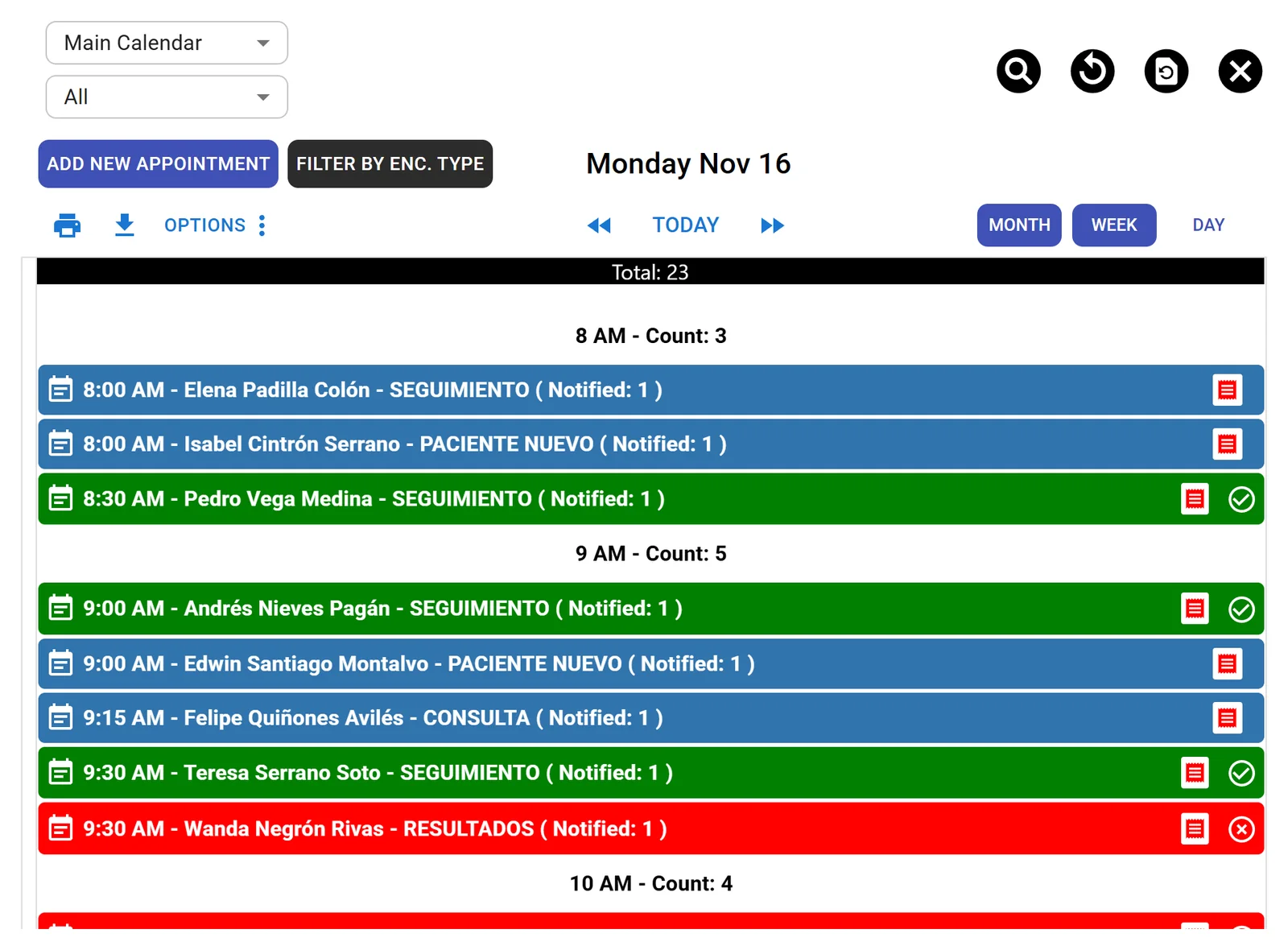
The Notify-Pro calendar showing a day of appointments with their confirmation status
Real console screen with demonstration data. The message is an example.

Text message

A short reminder with a link to confirm or cancel. Patients can also just reply CONFIRMAR or CANCELAR.

E-mail

A clear message with Confirm and Cancel buttons, written in the patient’s language.

Voice call

An automatic call reads the reminder; the patient presses 1 to confirm or 0 to cancel.

What Notify-Pro does

From the reminder to the waiting room, one tool

Five things your front desk does every day, done faster and with fewer mistakes.

Automatic notifications

Reminders that send themselves and come back answered

Decide once when each reminder goes out, for example three days before and again the day before, and Notify-Pro sends it every day for every provider. Patients answer from their phone and the calendar updates by itself.

  • Schedules for each provider and calendar: time of day, days before or after the appointment, and which channels to use.
  • Your own message templates in Spanish and English; the patient’s name, date, time and provider are filled in automatically.
  • Remind everyone, or only the patients who have not confirmed yet. Procedure reminders can use the pre-admission date and time.
  • You choose until when a patient may confirm, so late answers do not take you by surprise.
ConfirmedWaiting for an answerCancelled
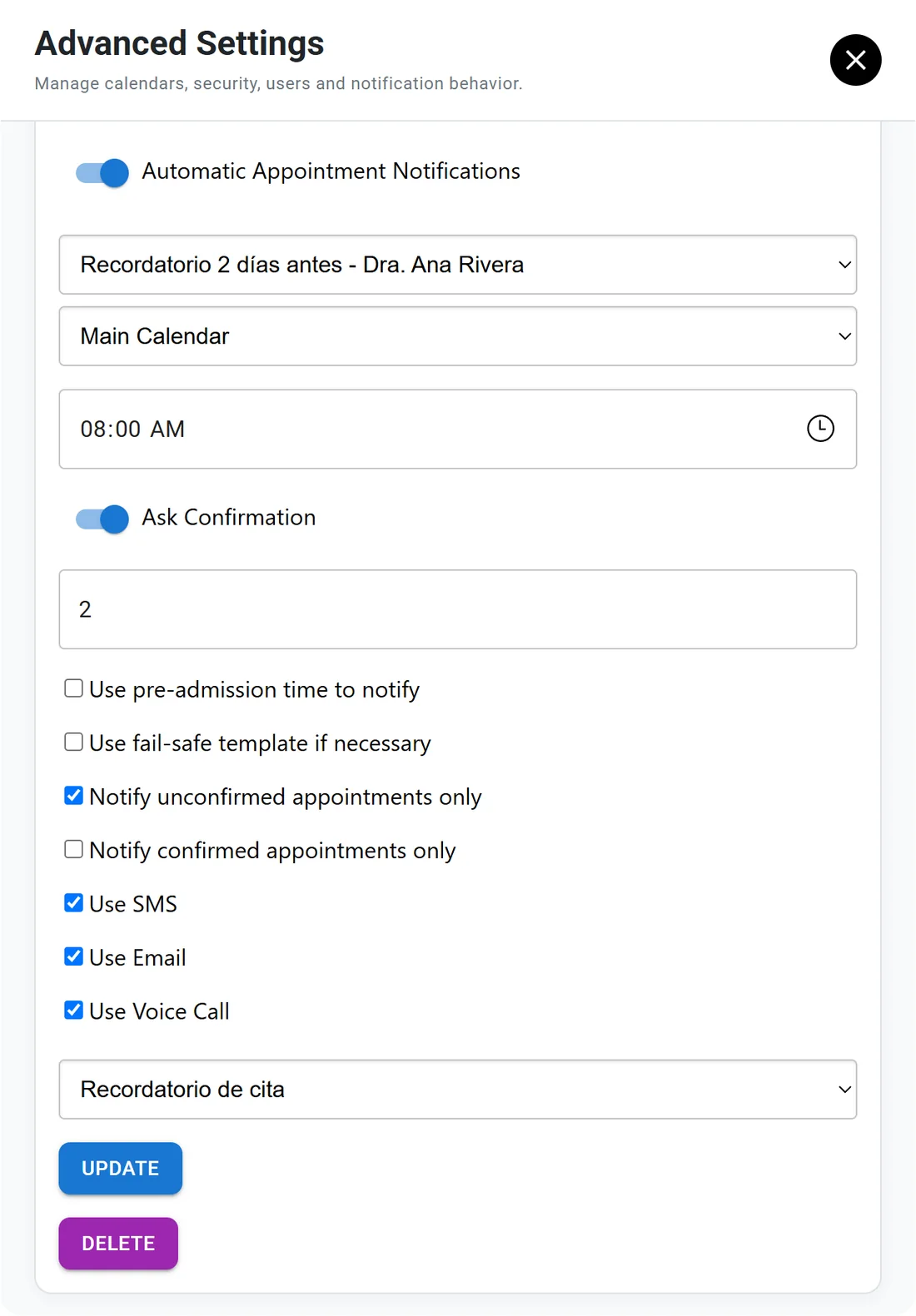
Notify-Pro settings for automatic appointment notifications
An automatic reminder schedule in the Notify-Pro console.
Patient appointment calendar

A calendar built for the people at the front desk

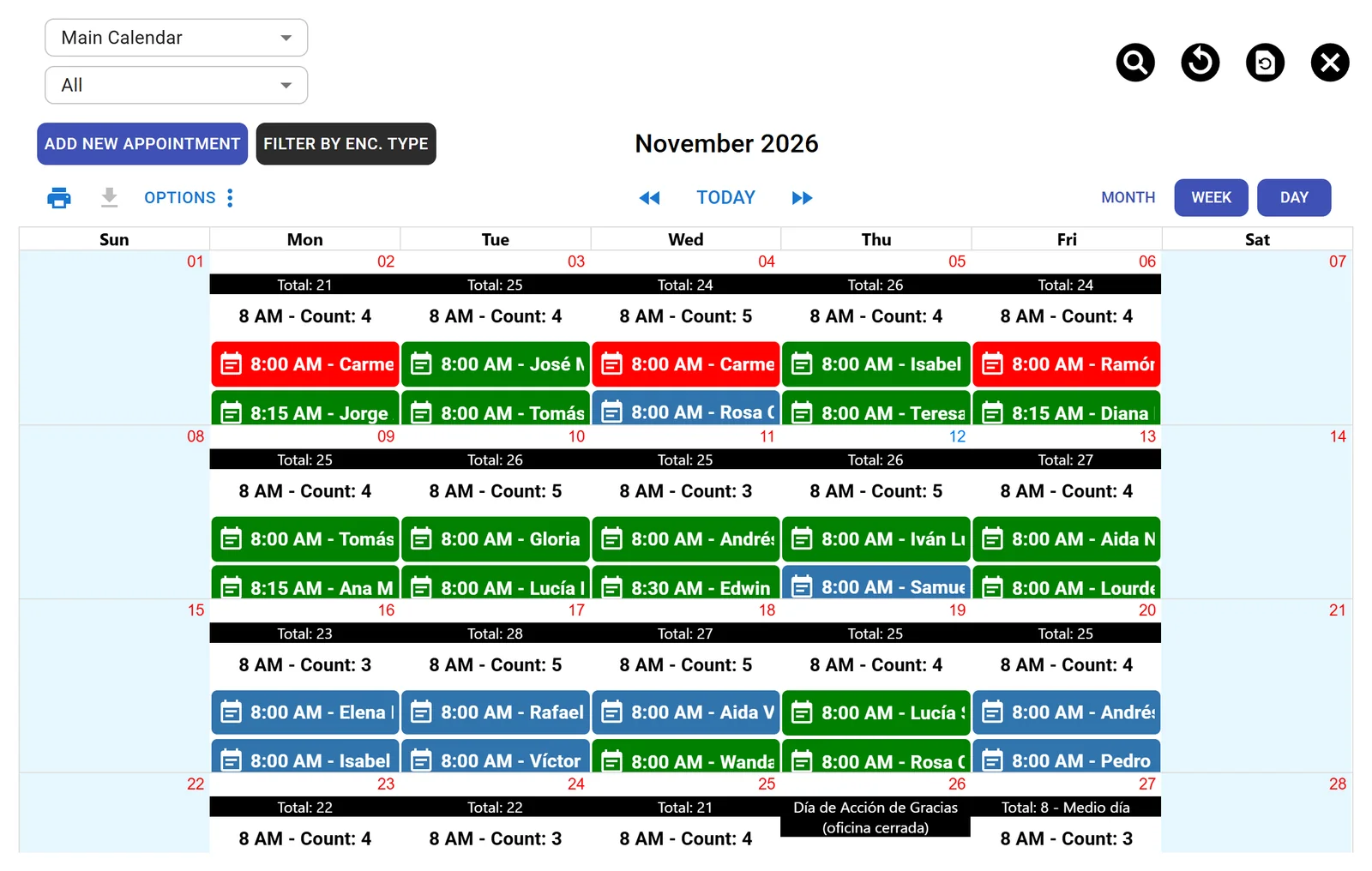
Month, week and day views with everything at a glance: who confirmed, who cancelled, who did not show up and what kind of visit each one is. Because appointments live in Notify-Pro, reminders need no lists and no double entry.

  • Several calendars per provider, with regular visits and procedures kept apart.
  • Your own visit types, each with its colour: read the day by confirmation status or by type of visit.
  • Find any patient’s appointments and jump straight to the day.
  • Labels, notes, no-show marks and the history of every change.
Month view of the Notify-Pro appointment calendar
The appointment calendar in the Notify-Pro console, with demonstration data.
Bulk changes

Move a whole day of appointments in minutes

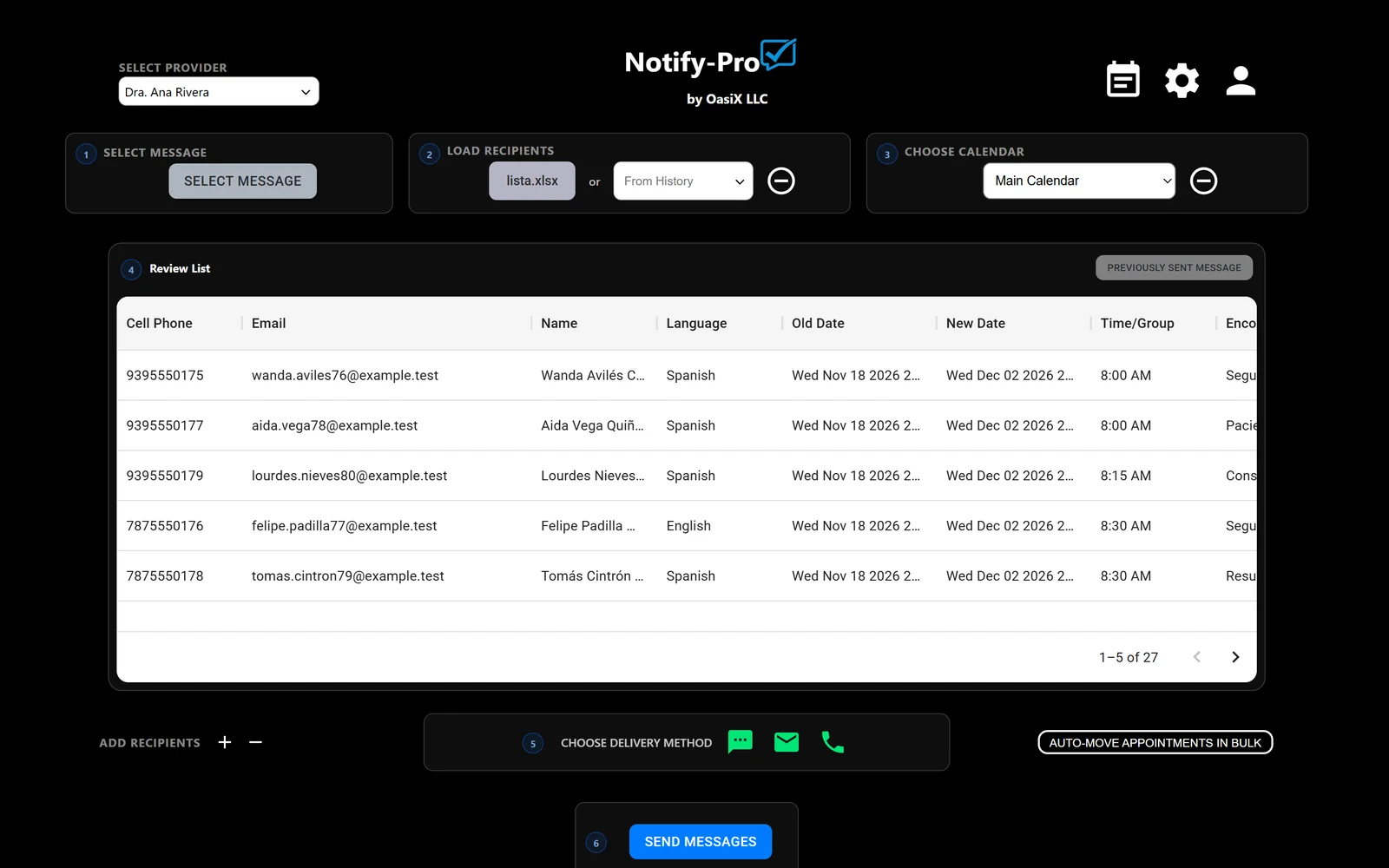
When a provider cannot be in the office, load the list with the old and the new dates. Notify-Pro moves the appointments on the calendar and tells every patient about the change.

  • Works from a simple Excel list or from a list you sent before.
  • Each appointment is matched by patient, phone, date and visit type before anything moves.
  • Patients get the new date by text, e-mail or voice call, and can confirm it.
  • Reserved for administrators and the users you authorize.
Notify-Pro screen reviewing a list of appointments to move to a new date
Reviewing the list before moving the appointments (demonstration data).
Next available spot

The next open slot, one click away

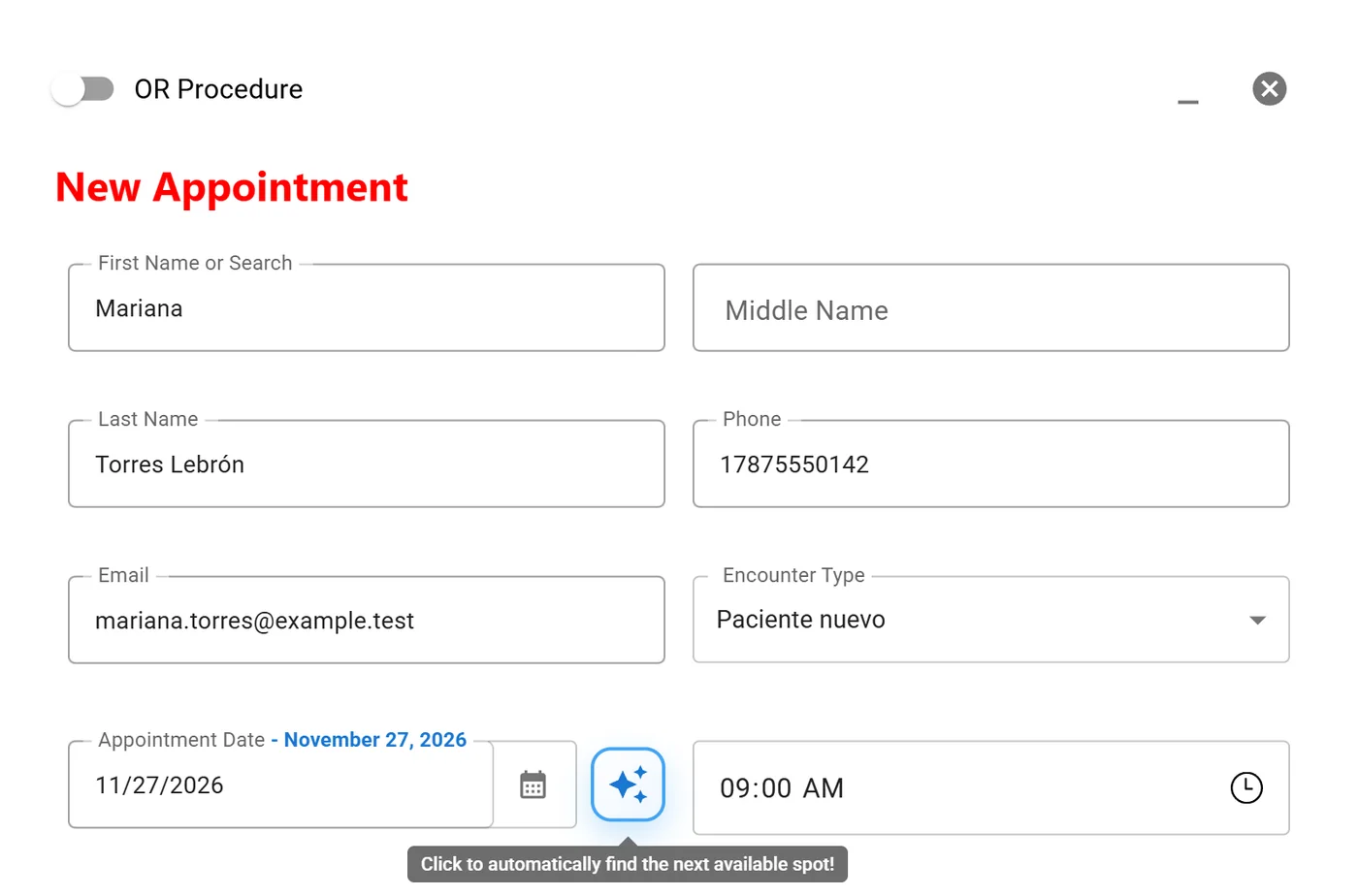
No more flipping through weeks. Choose the type of visit and Notify-Pro finds the next day and time that still has room according to your rules.

  • Search from today, or from the date the patient prefers.
  • Click again to see the following option.
  • It checks the room left for that visit type and time range at that moment.
  • The same search lets patients reschedule by themselves from a link.
New appointment window in Notify-Pro with the button that finds the next available spot
Finding the next available spot while creating an appointment.
Scheduling rules

Your rules, respected in every appointment

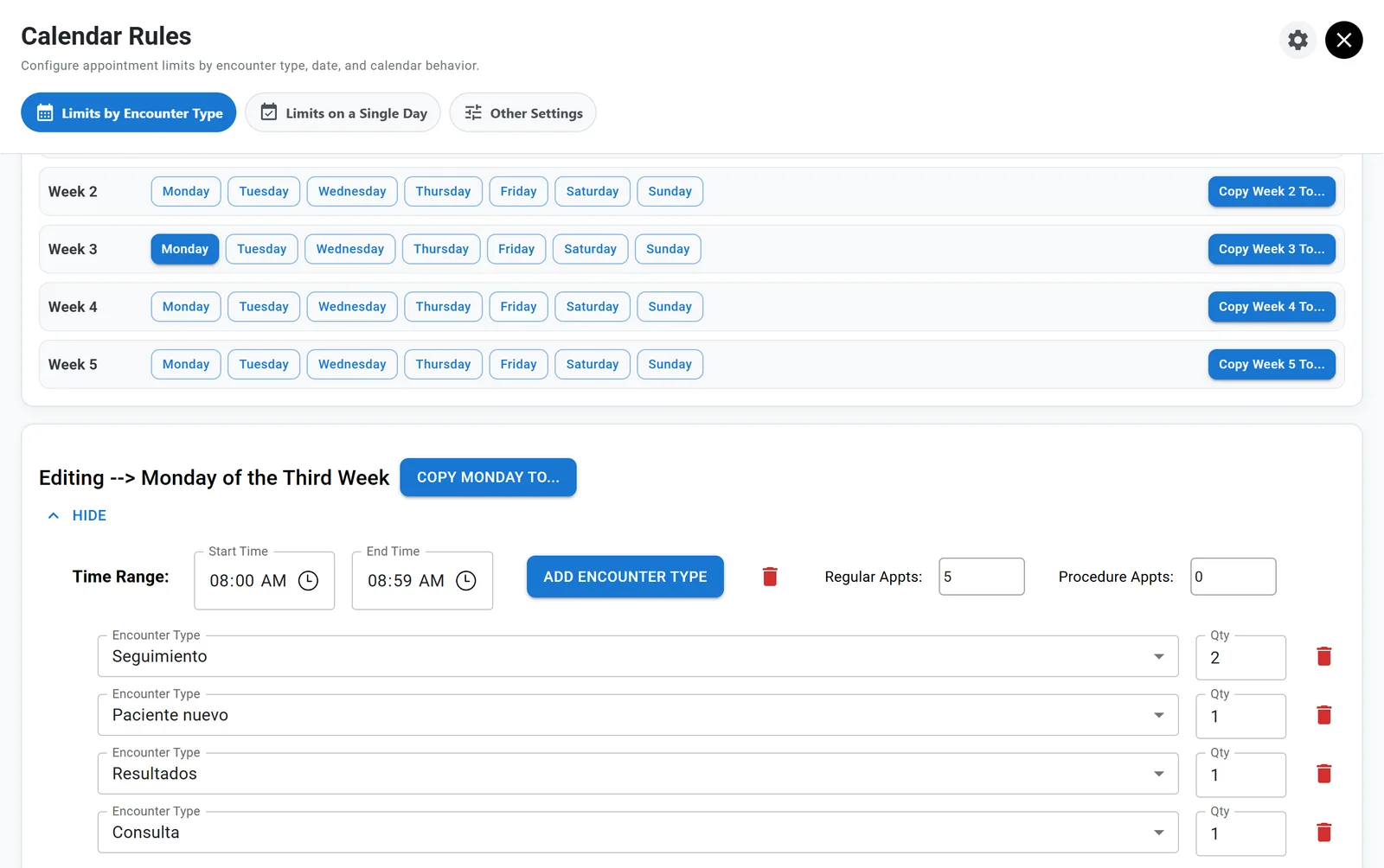
Define how many visits of each type fit in each time range, for every day of the week. Your staff can only book what is authorized, and anything outside the rules needs an approval that stays on record.

  • Limits by visit type, weekday, week of the month and time range.
  • Special limits for a single day: a short day, a holiday, a special clinic.
  • A full slot is blocked; an exception can require the reason, who authorized it and a security code.
  • A weekly report shows how many slots are left for each visit type.
Calendar rules in Notify-Pro: limits by visit type for each day of the week
Limits by visit type in the calendar rules.
How it works

Up and running without changing how you work

We open and prepare each account with you.

  1. Tell us about your practice

    Send the request form. We contact you to understand your providers, calendars and what you need.

  2. We set up your account

    Providers, calendars, visit types, message templates and a user for each member of your team.

  3. Your team books as usual

    Appointments are scheduled on the Notify-Pro calendar, guided by the rules you defined.

  4. Reminders run by themselves

    Patients confirm or cancel from their phone and the calendar shows it right away.

More tools

Everything else your front desk needs

Included in every account.

Rescheduling link

Send a link and the patient picks a new date among the slots your rules allow, after verifying their phone.

Messages to a whole list

Send a notice to a list of patients from Excel or from a previous send, by text, e-mail or voice call.

Spanish and English

Each patient receives messages and calls in their own language.

Opt-outs respected

Every text includes a link to stop notifications. Patients who opt out are not contacted again unless they authorize it.

"It is your turn" texts

Text the patient when their turn comes and tell them where to go.

Day lists and exports

Print the list of the day and export no-shows, cancellations or unconfirmed appointments.

Availability report

See the slots left for each visit type in the coming weeks, and how past weeks were used.

History of every appointment

What changed and when, which messages were sent and how the patient answered on each channel.

Patient directory

Name, phone, language and date of birth of each patient, found in seconds when booking.

Security

Made with the care patient information deserves

Access is personal, exceptions stay on record and messages say only what is needed.

A user for each person

Give every staff member their own user and password. Only administrators and the users you authorize can change settings, move appointments in bulk or approve exceptions.

Automatic lock

The console locks after 10 minutes without activity and asks for the password again.

Security codes

Exceptions to the rules can require a code from an authenticator app, the reason and who authorized it.

Everything on record

Appointments and patients keep a history of what changed and when.

Messages with just enough

Reminders are filled in with the name, date, time and provider. The reason for the visit is never added automatically.

Encrypted connections

The console and the pages your patients open always use encrypted connections (HTTPS).

See what Notify-Pro can do for your practice

Tell us who you are and what you need. Our team will contact you.

Request access